

What Is a Mobile Wallet and How Does It Work?
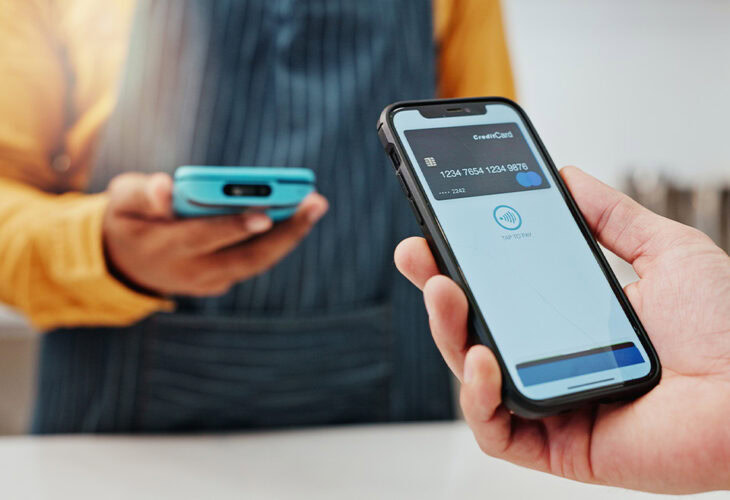
A mobile wallet is a digital wallet app on your phone or smartwatch that stores encrypted versions of your credit and debit cards so you can tap to pay instead of carrying plastic. It works using NFC (near-field communication) and replaces your real card number with a one-time token, which makes it one of the most secure ways to pay. The most common options are Apple Pay®, Google Pay™, and Samsung Pay® — and setting one up takes just a few minutes.
Keys, phone, wallet: most people don’t leave the house without all three. But your phone can already take the place of your wallet. Mobile wallets electronically store your payment information so you can pay with your credit or debit card straight from your phone — no plastic required.
Here’s exactly what a mobile wallet is, how it works, whether it’s safe, and how to set yours up.
What Is a Mobile Wallet, Exactly?
A mobile wallet is a digital wallet accessible through an app on a mobile device, such as a smartphone or smartwatch. Mobile wallets store digital versions of your credit and debit cards so you don’t have to carry the physical cards with you. Many also store other items, such as electronic ID cards, movie tickets, transit passes, and airline boarding passes.
Most phones have a mobile wallet app preinstalled on their phone. The most common are Apple Pay® for iPhone, Google Pay™ for Android™, and Samsung Pay® for Samsung® devices — and you can add your BluPeak debit or credit card to any of them.
Apple Pay® vs. Google Pay™ vs. Samsung Pay®: What’s the Difference?
All three work essentially the same way at checkout. The main difference is which device you carry:
| Apple Pay® | Google Pay™ | Samsung Pay® | |
|---|---|---|---|
| Works on | iPhone, Apple Watch, iPad, Mac | Android phones & Wear OS watches | Samsung Galaxy phones & watches |
| Pay in stores | Tap (NFC) | Tap (NFC) | Tap (NFC) |
| Authentication | Face ID, Touch ID, or passcode | Fingerprint, face, PIN, or pattern | Fingerprint, iris, or PIN |
| Card number shared with merchant? | No — tokenized | No — tokenized | No — tokenized |
| Cost to use | Free | Free | Free |
Whichever you use, your card details stay protected — and you keep earning the same rewards your card already offers.
How Does a Mobile Wallet Work?
Mobile wallets use NFC — near-field communication — to transmit payment data from your device to the merchant’s payment terminal over a very short distance.
Next time you’re checking out, you can tell the terminal accepts contactless payments if the card reader displays your mobile wallet app’s logo or the sideways Wi-Fi symbol. To pay, open your mobile wallet, select the card you want to use, authenticate with your face or fingerprint, and hold your phone over the terminal for a moment. That’s it.
Is a Mobile Wallet Safe? Is Apple Pay® Safe?
Yes — mobile wallets like Apple Pay® and Google Pay™ are among the most secure ways to pay, because they require multiple layers of authentication and never share your actual card number.
Here’s why they’re so secure:
- Tokenization. Just like inserting a chip card, your mobile wallet secures each payment with a randomly generated “token” instead of your real card number. The merchant never sees your actual card details, so there’s nothing useful for a thief to steal in a data breach.
- Biometric authentication, your face, fingerprint, or passcode is required to pay, so a stolen phone alone can’t be used to make purchases.
- No physical card to lose. Your cards stay safely at home, and your phone stays locked.
We also recommend these extra precautions:
- Keep your phone locked when you’re not using it, and require a strong passcode, fingerprint, or facial recognition to unlock it.
- Protect your BluPeak card with Card Management in digital banking. You can temporarily turn your card off if it’s misplaced, or report it lost or stolen to prevent unauthorized use.
- Stay alert to fraud. Mobile wallets are secure, but scammers still target people directly — learn how to spot the latest scams.
How Do You Set Up a Mobile Wallet?
Setting up a mobile wallet takes just a few minutes:
- Open the mobile wallet app that came with your phone (Apple Pay®, Google Pay™, or Samsung Pay®), or download it.
- Add your card by scanning it with your phone’s camera or typing in the numbers manually.
- Verify your card. Your card issuer electronically verifies it, and an image of your card appears in the app once it’s ready to use.
- Add more cards as needed. Your first card becomes the default, but you can choose a different one at checkout.
Need directions for your specific device? See our mobile wallet setup guide.
What Are the Benefits and Drawbacks of Mobile Wallets?
Mobile wallets have very few downsides. Not every small retailer has contactless technology yet, so it’s worth carrying a backup card — and your phone needs to be charged to pay. Beyond that, the benefits stack up:
- Faster, touch-free checkout. No card to hand over, no pen to share.
- Less paper clutter. Your transactions are stored electronically and can be reviewed anytime in digital banking.
- You keep your rewards. You’ll still earn rewards on your BluPeak card exactly as if you’d paid with the physical card.
- Stronger security. Tokenization and biometrics make it safer than handing over a physical card.
Ready to Ditch the Bulky Wallet?
Add your BluPeak debit or credit card to your phone’s mobile wallet and start paying securely in seconds. Learn how to set up your mobile wallet, explore BluPeak credit cards, or open a BluRipple Checking Account.
Mobile and data rates apply when using mobile payment systems and Mobile Banking. iPhone is a registered trademark of Apple Inc.
FAQs
What is a mobile wallet?
A mobile wallet is a digital wallet app on your smartphone or smartwatch that securely stores digital versions of your credit and debit cards, letting you tap to pay instead of carrying physical cards. Common examples include Apple Pay®, Google Pay™, and Samsung Pay.®
How does a mobile wallet work?
Mobile wallets use NFC (near-field communication) to send payment data a short distance to the merchant’s terminal. You open the app, choose a card, authenticate with your face or fingerprint, and hold your phone near the reader.
Is Apple Pay safe?
Yes. Apple Pay® and other mobile wallets are considered among the safest ways to pay because they require biometric or passcode authentication and use tokenization — the merchant receives a one-time token rather than your real card number.
Are mobile wallets safer than credit cards?
Generally yes. A mobile wallet never shares your actual card number with the merchant and requires your face, fingerprint, or passcode to authorize a payment — protections a physical card doesn’t have.
Do you still earn rewards using a mobile wallet?
Yes. Paying with a card stored in your mobile wallet earns the same points, cash back, or rewards you’d get paying with the physical card.
What happens if I lose my phone?
Your digital cards can’t be used without your biometrics or passcode. For some phones you can remotely lock or wipe your device. BluPeak has a Card Management option in our digital banking app to turn your card off instantly.